DeployPilot
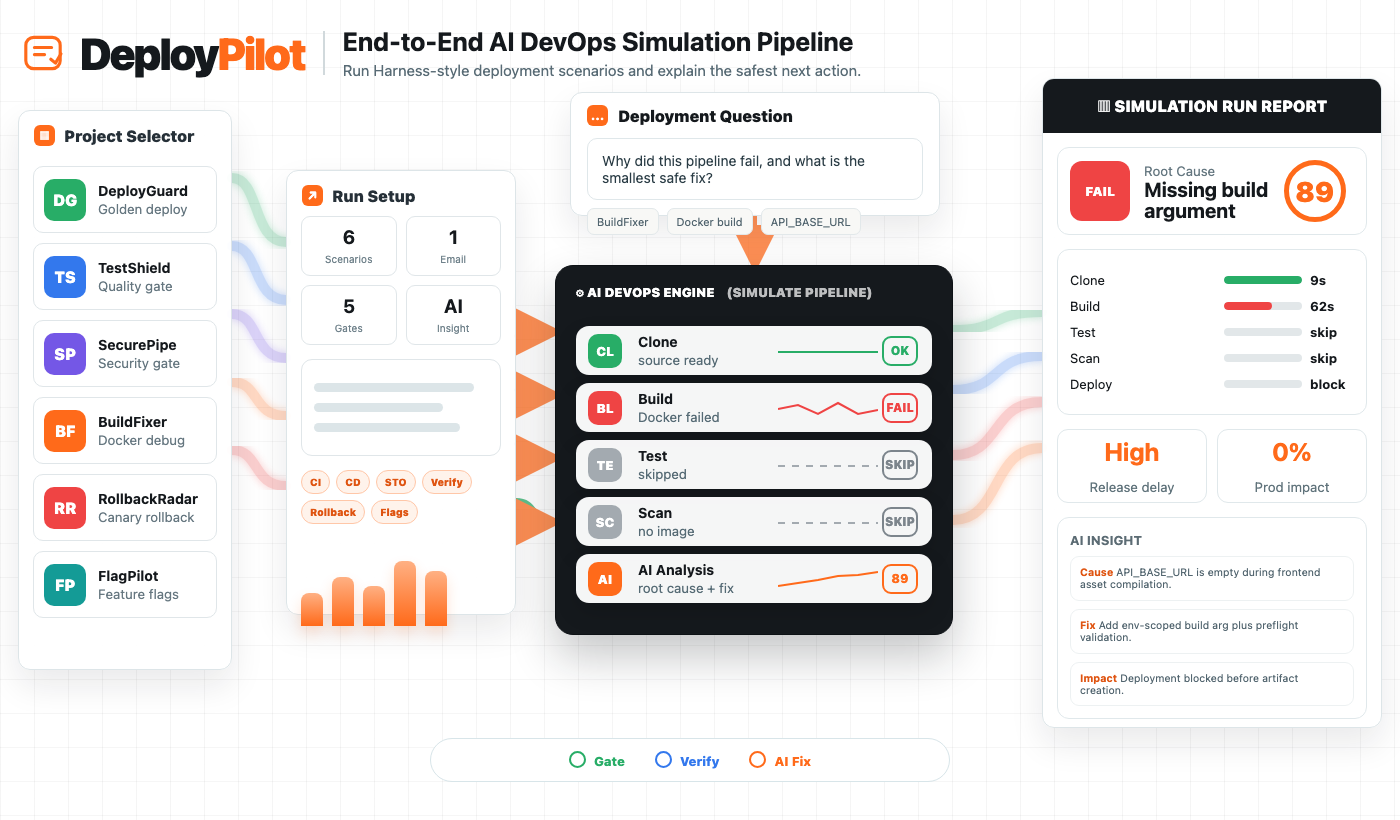
Problem tier down for an AI DevOps simulation lab that lets visitors run Harness-style deployment scenarios, inspect CI/CD logs, understand AI failure analysis, and evaluate release decisions before touching a real production system.
Concept
DevOps teams need a safe way to test deployment decisions before real releases fail.
Deployment workflows are risky to learn directly in production because build failures, security gates, flaky tests, canary rollback, and feature flag mistakes can block teams or affect customers. DeployPilot turns those release situations into a controlled AI DevOps simulator: choose a Harness-style project, enter tester email, run a scenario, inspect GitHub Actions-style logs, and review AI root cause, confidence, fix, impact, YAML, and run history.
User Personas
Arjun Mehta
DevOps Lead
- Age
- 34
- Context
- Owns release reliability and needs repeatable deployment checks for different failure modes.
- Behavior
- Runs pipeline scenarios, checks logs, validates rollback logic, and shares fixes with engineers.
- Pain
- Cannot safely demo every release failure without touching complex real infrastructure.
Nisha Rao
Platform Engineer
- Age
- 29
- Context
- Builds CI/CD templates and wants a clear way to test quality, security, and deploy gates.
- Behavior
- Compares scenarios, reads generated YAML, reviews failure analysis, and checks saved runs.
- Pain
- Pipeline knowledge is scattered across logs, docs, dashboards, and tribal experience.
Kabir Shah
Solution Engineer
- Age
- 32
- Context
- Needs polished DevOps demos that explain business impact, not only technical logs.
- Behavior
- Selects a simulation, runs it live, explains the AI insight, and captures tester feedback.
- Pain
- Static demos do not show how teams should react when release conditions change.
Selected User Persona
Arjun Mehta, DevOps Lead
Arjun is the strongest starting persona because he owns release safety and needs to reason through several deployment outcomes quickly. His workflow tests DeployPilot's full value chain: project selection, scenario setup, pipeline execution, log reading, AI root-cause analysis, rollback judgment, and repeatable saved run history.
User Journey Map
| Journey Stage | Actions | Emotion | Pain Points | Opportunities |
|---|---|---|---|---|
| Pick Scenario | Arjun chooses DeployGuard, TestShield, SecurePipe, BuildFixer, RollbackRadar, or FlagPilot. | Focused | Real release incidents are hard to reproduce on demand for demos or learning. | Turn common DevOps situations into reusable simulation cards. |
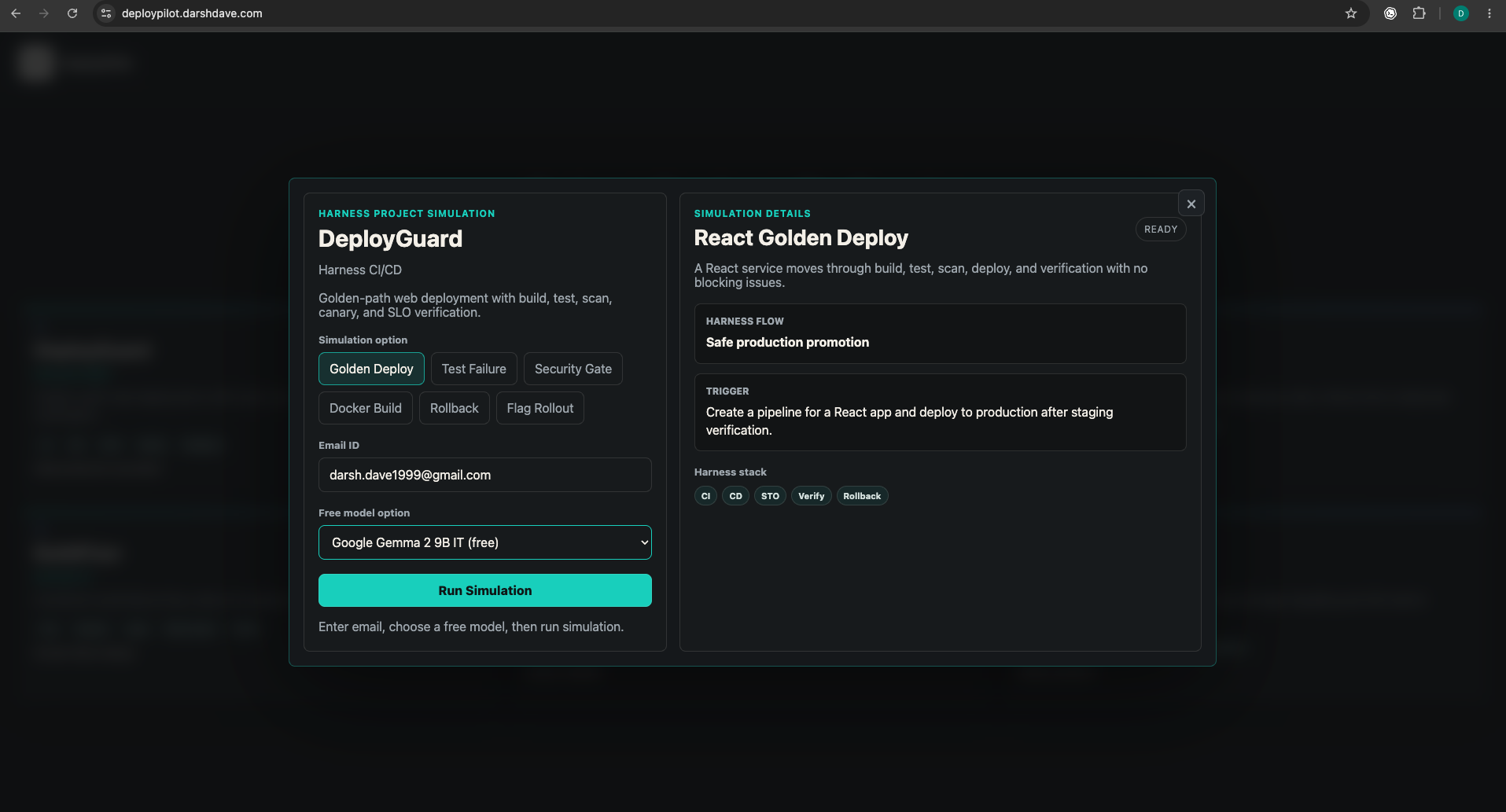
| Enter Tester Email | He adds only an email address, selects a simulation option, and chooses a free model path. | Low friction | Tester capture often asks for too much information and slows the demo. | Keep identity lightweight while still saving run history. |
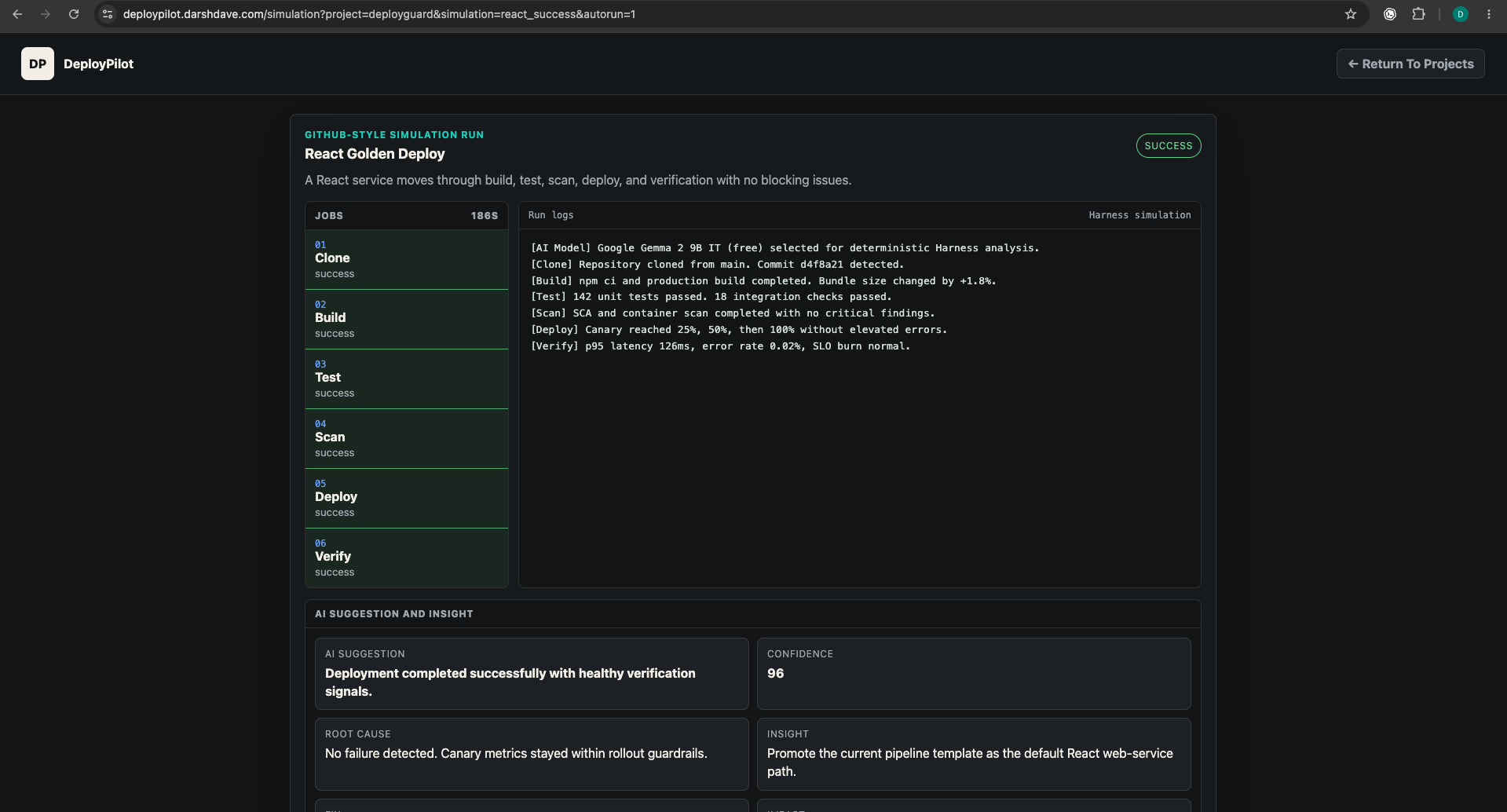
| Run Pipeline | DeployPilot executes deterministic stages such as clone, build, test, scan, deploy, verify, and rollback. | Analytical | Logs are usually noisy and difficult for non-specialists to interpret quickly. | Show a clean GitHub Actions-style run with stage outcomes and readable logs. |
| Read AI Insight | He reviews summary, root cause, recommendation, fix, confidence, severity, and business impact. | Confident | Teams know a pipeline failed but struggle to explain the smallest next action. | Convert run output into a concise diagnosis and remediation direction. |
| Reuse Evidence | He saves the run, revisits history, and uses the simulation as a teaching or sales artifact. | Prepared | Demos disappear after the session and cannot be compared across scenarios. | Persist run history locally and make Supabase storage available for production capture. |
Pain Points
Deployment Learning Is Risky
Teams cannot safely learn release failures by experimenting directly in production, but static docs do not teach the operational decision-making well.
Pipeline Logs Are Hard To Explain
Build, test, scan, deploy, and verify logs contain the right evidence, but the cause and fix are often buried inside technical output.
Release Scenarios Are Fragmented
Quality gates, security blocking, Docker errors, rollback, and feature flags are usually demonstrated in separate tools or scripts.
Tester Capture Is Too Heavy
Portfolio demos often ask for too many fields. For quick validation, email-only capture is enough to connect a run to a tester.
AI Insights Lack Product Context
Generic AI summaries do not explain confidence, business impact, release safety, or the smallest operational fix.
Run History Is Not Durable
Without saved runs, teams cannot compare scenarios, revisit past failures, or collect evidence from real testers over time.
Pain Point Prioritization
| No. | Pain Point | Time | Effort |
|---|---|---|---|
| 01 | Deployment learning is risky | ||
| 02 | Pipeline logs are hard to explain | ||
| 03 | Release scenarios are fragmented | ||
| 04 | Tester capture is too heavy | ||
| 05 | AI insights lack product context | ||
| 06 | Run history is not durable |
Solutions
OK Ideas
Helps teams review deployment readiness, but does not simulate failures or explain logs.
Creates pipeline snippets, but does not show runtime behavior, confidence, or business impact.
Improves understanding of terms, but cannot teach release decisions through interaction.
Best Ideas
Runs common CI/CD situations with stages, logs, outcomes, and clean failure states.
Converts technical logs into root cause, fix, confidence, and business impact.
Lets testers revisit deployment runs and compare outcomes across scenarios.
Moonshots
End-to-end simulation workspace for release learning, failure analysis, and deployment decision-making.
Connects to CI/CD providers and replays real failed runs with safe AI recommendations.
Monitors releases, predicts risk, and recommends rollback, flag hold, or promotion automatically.
Moonshot Prioritization
| No. | Moonshot | Time | Effort |
|---|---|---|---|
| 01 | DeployPilot AI DevOps Lab | ||
| 02 | Real pipeline replay | ||
| 03 | Autonomous release coach |
Selected Solution
DeployPilot AI DevOps Lab
DeployPilot AI DevOps Lab is the selected solution because it creates the highest learning value without needing real production access. It packages common release conditions into interactive simulations, then explains what happened through readable logs, AI diagnosis, confidence, business impact, and the smallest next fix.
Solution Architecture
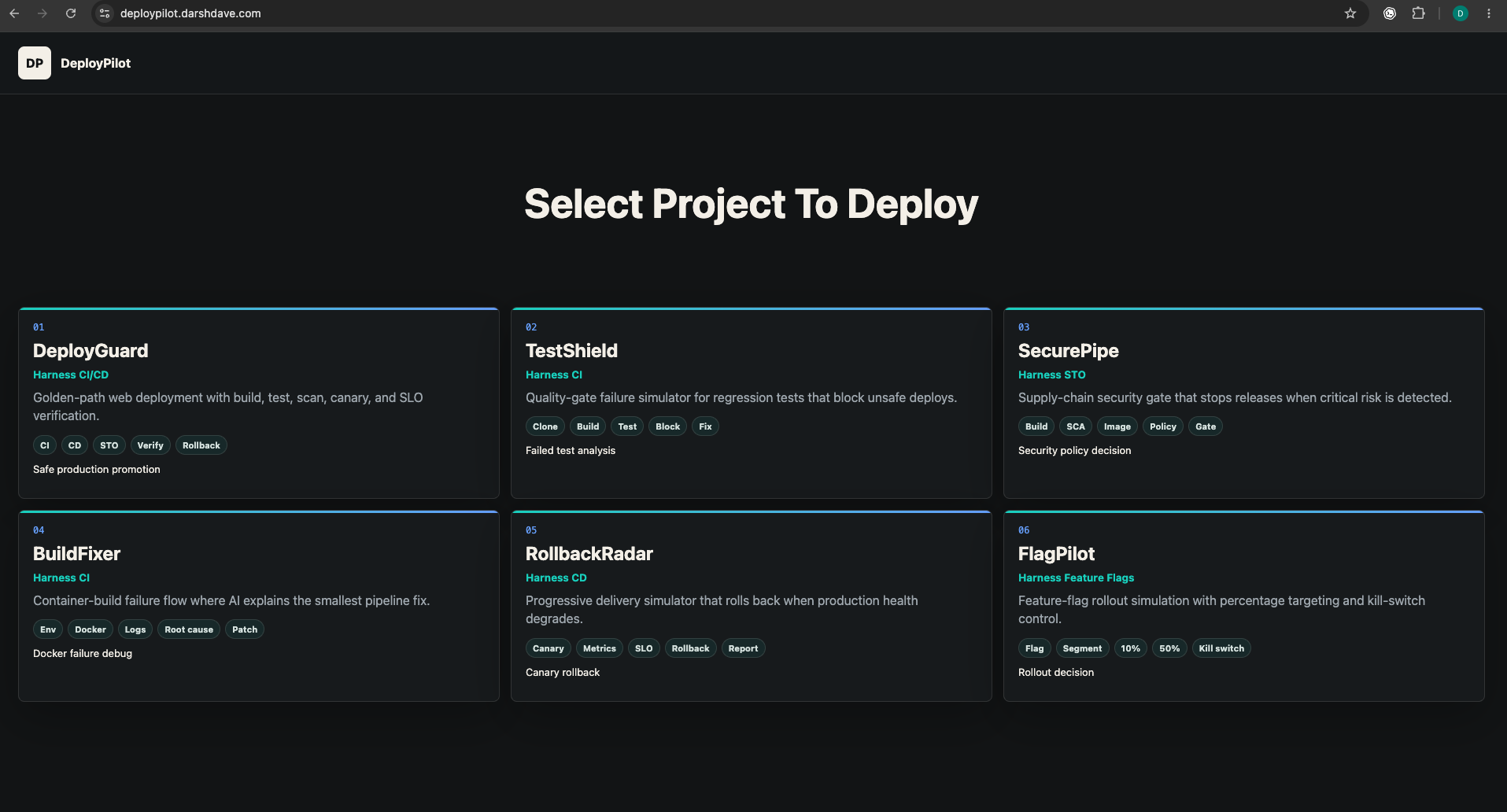
Six Harness-style simulation projects cover golden deploys, test failures, security gates, Docker errors, rollback, and feature flags.
Email-only capture keeps the demo low friction while still connecting each run to a tester and history record.
Deterministic scenario data generates stages, outcomes, logs, duration, severity, and deployment decisions.
Each run produces summary, root cause, recommendation, fix, confidence, severity, and business impact.
Harness-style YAML explains how the pipeline could be represented in an actual DevOps workflow.
Runs save to localStorage immediately, with a Supabase schema ready for future backend persistence.
Prototype Screens
Simulation Types
Golden-path web deployment with build, test, scan, canary, and SLO verification.
Quality-gate failure simulator for regression tests that block unsafe deploys.
Supply-chain security gate that stops releases when critical risk is detected.
Container-build failure flow where AI explains the smallest pipeline fix.
Progressive delivery simulator that rolls back when production health degrades.
Feature-flag rollout simulation with percentage targeting and kill-switch control.
Final Product Direction
DeployPilot is an AI DevOps product demo for release learning and portfolio validation. It helps users move from abstract CI/CD concepts to hands-on simulation: select a deployment scenario, run it, inspect stage logs, understand the AI diagnosis, and reuse saved run evidence for learning, demos, and product feedback.